


Action required to continue receiving text notifications
As part of our ongoing commitment to keeping our community informed and safe, we want to ensure your emergency notification contact information is up to date.
If you receive emergency notifications only by email, no action is required.
If you would like to continue or begin receiving emergency notifications via text message, please follow the steps below to confirm or add your mobile phone number by April 6.
It is recommended that you always update your primary mobile phone number in MaineStreet. Changes made later within the emergency notification system will not update your phone numbers in MaineStreet.
- Navigate to your MyCampus portal.
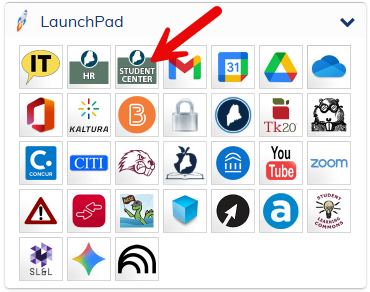
- In the LaunchPad on the left, select the Student Center Icon.
- Click on the Back to MaineStreet tile.
- On the next page, select the Classic Student Center tile.
- On the next page, under Personal Information, select User Preferences.
- On the next page, click on the Personal Information tab.
- Next, click Phone Numbers.
Check the Phone Type column (below) for the designation “Cellular.” If a cellular phone number is already listed and the Phone Type is set to Cellular, no further action is required.
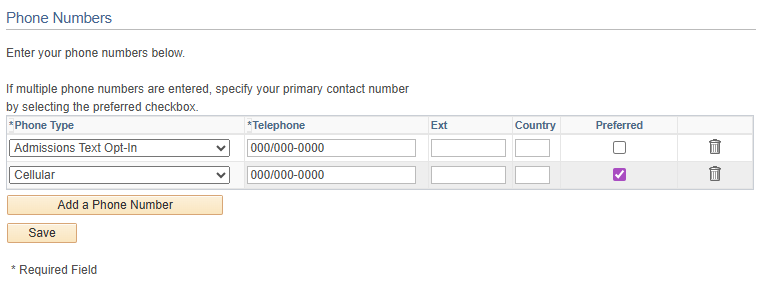
If your cellular phone number is listed but the Phone Type is set to anything other than cellular, you will not receive text messages. These Phone Type designations cannot be edited. A new entry will be required. You can have the same number listed for more than one.
To add a cellular phone number:
- Click the Add a Phone Number button below the Phone Type table
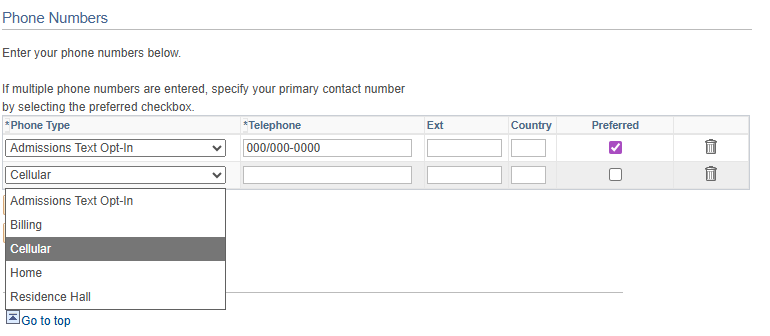
- Click in the new Phone Type box and select Cellular from the drop-down menu, as seen below
- Enter your phone number, including area code
- Click Save
Watch for an email from UMS soon with instructions on how to customize your emergency notification experience (including adding more mobile phone numbers) with Rave, the University of Maine System’s new alert platform.
If you need assistance updating your information, please contact IT Support at help@maine.edu or ITSupport.maine.edu.
Keeping your contact information current ensures you receive timely emergency notifications.
Thank you for your attention to this important update.